Bons Payment Methods Deposits and Withdrawals
Bons supports local Indian payment methods and crypto for account funding and payouts. Deposit with UPI, Paytm, PhonePe, NetBanking or cryptocurrency. Minimum deposit starts from ₹500 on reported UPI routes, while withdrawals usually start from ₹500 after account checks.
Make a Deposit Claim Deposit Bonus
| Minimum Deposit | ₹500 reported for UPI routes; the cashier shows the applicable value |
| Minimum Withdrawal | ₹500 |
| Local Methods | UPI, Paytm, PhonePe, NetBanking |
| Cards | Visa, Mastercard where available |
| Crypto | Bitcoin, USDT, Ethereum |
| Currencies | INR, USD |
| First Cashout | KYC verification can be required |
| Support | support@bons.com |
Deposit
Methods, limits and speed
Steps
How to fund account
Withdraw
Cashout limits and timing
KYC
Verification before payout

FAQ
Payment questions
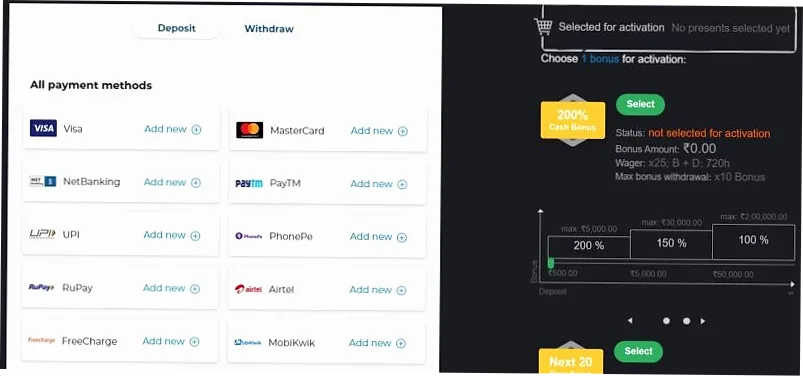
Available Deposit Methods in India
Most deposit methods work all day. Bons does not add a deposit fee, but your bank, wallet or blockchain service can apply its own charge.
| Method | Min Deposit | Min Withdrawal | Fee from Bons |
|---|---|---|---|
| UPI | ₹500 | ₹1,000 | None reported |
| Paytm | ₹500 | ₹1,000 | None reported |
| PhonePe | ₹500 | ₹1,000 | None reported |
| IMPS | ₹1,000 | ₹1,000 | None reported |
| Visa / Mastercard | $10 equivalent | $10 equivalent | None reported |
| USDT | $10 equivalent | $10 equivalent | Network fee applies |
| Bitcoin / Ethereum | $10 equivalent | $50 equivalent | Network fee applies |
| Litecoin / XRP | $10 equivalent | $20 equivalent | Network fee applies |
Where these figures come from: the table reflects India-oriented payment reviews checked on 27 July 2026, not limits published in the Bons terms. The cashier shows the values that actually apply to your account, currency and method.
How to Make a Deposit Step by Step
Login or Register
Log in to your Bons account, or create an account first if you are new.
Open Cashier
Tap Deposit in the account area or mobile app cashier.
Select Method
Choose UPI, Paytm, PhonePe, NetBanking, card or crypto.
Enter Amount
Enter the deposit amount. For local methods, the minimum can start from ₹500 on reported UPI routes.
Select Bonus
If this is your first deposit, choose the welcome bonus before confirming payment.
Confirm Payment
Approve the transaction in your bank, wallet or crypto wallet.
Check Balance
Funds usually appear within seconds or minutes. Save the transaction ID if there is a delay.
Deposit Methods in Detail
UPI Deposit
UPI is the fastest local payment option for many Indian players. Use your UPI app, enter the amount, confirm the transfer and wait for the balance update.
| Pros | Instant, familiar, small deposits |
| Watch | Daily bank and UPI limits |
Paytm and PhonePe
Wallet-style payments are convenient for regular deposits. Check the exact amount, payment note and transaction status before leaving the cashier.
| Pros | Fast mobile flow |
| Watch | Wallet limits and app downtime |
NetBanking and IMPS
Direct bank transfer works well for larger amounts. Processing can take several minutes because bank approval and payment matching take extra steps.
| Pros | Higher bank limits |
| Watch | Bank processing time |
Crypto Deposits
Bitcoin, USDT and Ethereum are useful when local banking is slow. Copy the wallet address carefully and check coin type before sending funds.
| Pros | Fast crypto confirmation |
| Watch | Wrong coin or address mistakes |
| Coin | Min Deposit | Speed | Important Check |
|---|---|---|---|
| Bitcoin | $10 | 5 to 20 min | Use BTC address only |
| USDT | $10 | Instant to 10 min | Check TRC-20 or ERC-20 before sending |
| Ethereum | $10 | 1 to 15 min | Use ETH address only |
| Litecoin | When available | 1 to 10 min | Confirm coin support in cashier |
How to Deposit via Bons Mobile App
All payment methods are available in the app when supported for your account. Open the Bons app, tap Deposit, select method, enter amount and confirm. Limits and processing time match the cashier on the website.
Android App
Install the APK, log in, open Deposit and use UPI, Paytm, PhonePe or crypto from the phone screen.
iPhone and iPad
Open Bons through Safari shortcut, login and use the same cashier flow. Keep the payment app ready before you confirm.
Deposit Bonuses Extra on First Top-Up
A deposit can unlock the welcome bonus if your account is eligible. Full offer terms stay on the bonuses page; this section only shows the payment link between deposit and bonus.
Welcome Bonus
First deposit match for new users. Select it before confirming your payment.
Promo Code
If the code field is active, enter the code before your first deposit.
Reload Bonus
Some campaigns add extra value to selected top-ups after registration.
Deposit Security and Payment Checks
Use payment methods registered in your own name. Bons payment checks are designed to match account, cashier and KYC details before withdrawals.
SSL Encryption
Login, cashier and personal data pages use encrypted transfer.
License
Bons lists Curacao licence OGL/2024/774/0362 for Owl In N.V. for its operations.
Your Own Method
Payment name should match the Bons account name to avoid KYC delays.
Transaction ID
Save UTR or transaction receipt when a deposit is delayed.
Common Deposit Problems and Solutions
| Problem | Solution |
|---|---|
| Deposit not credited after 15 min | Check payment app status. If confirmed, contact live chat with screenshot and transaction ID. |
| Payment failed | Check balance, limit and internet connection, then try a different method. |
| Amount below minimum | Use the minimum shown in the cashier for that method. |
| Payment app not loading | Update the app, clear cache or use mobile browser. |
| Bank declined transfer | Contact the bank or choose a wallet or crypto method. |
| Balance did not update | Log out and back in. If still missing, contact support with transaction ID. |
Withdrawal Overview How to Cash Out
Withdrawals use local payment methods, bank transfer and crypto where available. First withdrawal can require KYC. Active bonuses must be wagered or cancelled before cashout.
| Stage | Reported timing | Note |
|---|---|---|
| UPI, Paytm, PhonePe withdrawal | Usually within 24 hours after approval | Larger amounts may take up to 48 hours |
| IMPS withdrawal | Depends on review and bank | No fixed timing reported |
| Card withdrawal | Depends on the issuing bank | Not an INR route |
| Crypto withdrawal | Network time plus account processing | Blockchain fee applies |
| Amounts over $1,000 equivalent | May be processed up to 48 hours | Reported threshold |
Reported caps: a monthly withdrawal ceiling of $100,000 equivalent, and a separate $5,000 equivalent per week for winnings linked to a bonus. These are review-reported values checked on 27 July 2026, not a published service level. The cashier is the controlling source.
Important Withdrawal Rules
- Withdrawal method should match the deposit method when possible.
- KYC verification is required before first payout.
- Deposit amount may need at least 1x turnover before cashout.
- Active bonus can block or cancel withdrawal.
- Use only your own bank, wallet or crypto account.
- One pending request can block another request.
- Peak payment times can slow processing.
- Daily limits vary by method and account level.
Account Verification Before First Withdrawal
KYC is usually required before your first withdrawal. Complete it once, then later payouts can process faster when account data and payment details match.
Documents Needed
- ID proof: passport, national ID, PAN card or driver license.
- Address proof: utility bill or bank statement from the last 3 months.
- Selfie with ID if the security team asks for it.
- Payment proof if account and payment details need extra checking.
Verification Steps
- Open Profile and Verification.
- Upload clear photos of documents.
- Wait for review, usually 1 to 24 hours.
- Check Verified status before requesting payout.
Withdrawal Problems and Solutions
| Problem | Reason | Solution |
|---|---|---|
| Rejected | KYC not completed | Upload ID and address proof in Profile. |
| Rejected | Active bonus | Complete wagering or cancel the bonus first. |
| Rejected | Different payment method | Use the same method used for deposit when required. |
| Pending 24h+ | Queue or first payout review | Contact support after 48h with request ID. |
| Cancelled | Amount below minimum | Check the minimum withdrawal table and retry. |
| Completed but not received | Payment provider delay | Wait, save transaction ID and contact support if still missing. |
Crypto Withdrawals Fast Payout Option
Crypto can be faster than bank transfer when the wallet address and coin type are correct. USDT and Bitcoin are common options, but always check the cashier before requesting a payout.
Speed
Crypto payouts can process in 10 to 30 minutes after approval.
Higher Limits
Crypto methods can allow larger amounts than local wallets.
Address Check
A wrong address or coin type can permanently lose funds.
Coins
Bitcoin, USDT and Ethereum can be available depending on account settings.
Payments in the Bons App
Deposits and withdrawals work in the app with the same account wallet. Open the app, tap Deposit, switch tabs when needed, select a method, enter amount and confirm the transaction.
Frequently Asked Questions Bons Payments
Minimum deposit starts from ₹500 on reported UPI routes for local methods such as UPI, Paytm, PhonePe and UPI apps. The cashier shows the exact current amount.
UPI and wallet deposits are usually instant or credited within minutes. NetBanking, cards and crypto depend on confirmation time.
Bons does not add a deposit fee. Your bank, wallet, card issuer or blockchain service can apply its own charge.
Yes. Bitcoin, USDT and Ethereum can be available. Always check coin type and address before sending funds.
Yes. The app cashier supports the same account balance, deposit options and payment history as the website.
Yes, eligible new users can claim the 200% on the first deposit welcome bonus. Check bonuses and promo code before paying.
Check the payment app first. If the transfer is confirmed, contact support with screenshot, amount, time and transaction ID.
The common minimum withdrawal is ₹500 for local methods. Crypto and bank methods can have different minimums.
Common reasons include missing KYC, active bonus, wrong payment method, low amount or payment details that do not match the account.
Yes. First withdrawal can require ID, address proof and sometimes payment proof. Complete KYC early to reduce delays.
No. Use payment methods in your own name. Third-party payments can trigger KYC issues and rejected withdrawals.
Open your payment app, go to transaction history, select the completed transfer and copy the UTR or transaction reference.
The minimum deposit starts from INR 100 for local methods such as UPI, Paytm, PhonePe and UPI apps.
Most local deposits are instant or credited within minutes. Bank and crypto timing depends on payment confirmation.
The minimum withdrawal is usually INR 500 for local methods and can vary by crypto coin.
Yes, KYC can be required before the first withdrawal. Upload clear ID and address proof when asked.
Responsible Gaming
Payment tools should support a fixed budget, not increase risk. Bons is for players aged 18 and over. Set deposit limits, avoid chasing losses, withdraw when you reach your target and contact support if you need account limits.